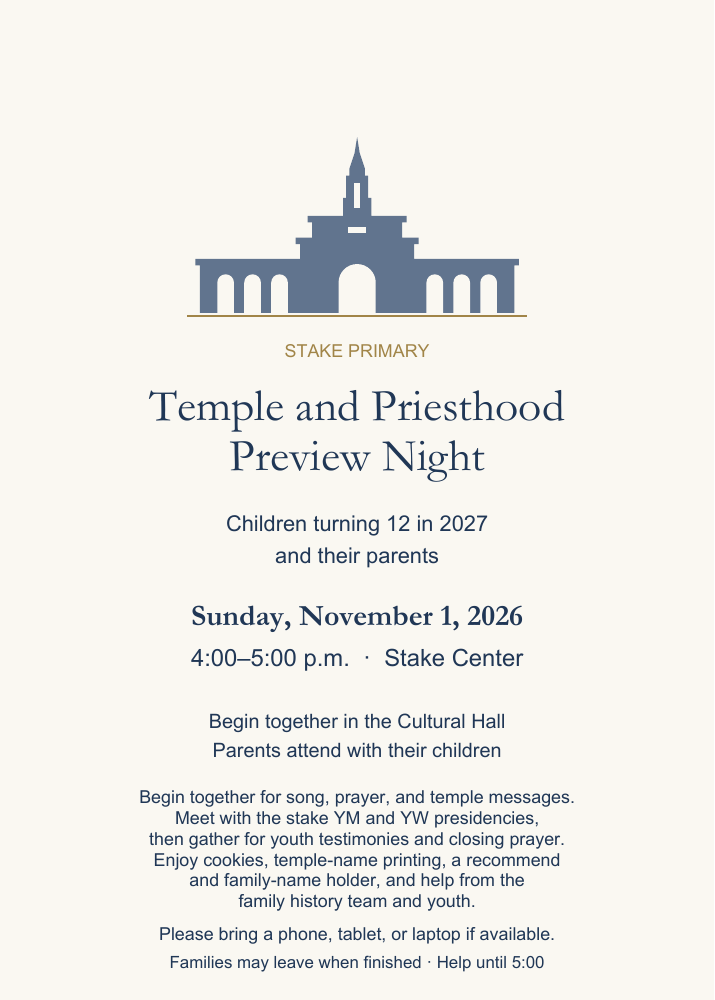
Sunday, November 1, 2026
Temple and
Priesthood
Preview Night
An evening for children turning 12 in 2027 and their parents to prepare for youth programs and the blessings of temple worship.

Preparing to serve in the house of the Lord
Sunday, 2026
Combined meeting in the Cultural Hall
Parents attend with their children.
Why we gather
Our purpose
According to the Handbook, the Temple and Priesthood Preparation Meeting is intended to help children understand priesthood purposes, responsibilities, and blessings; prepare to make and keep sacred covenants; learn the blessings and joy of helping unite families through temple and family history work; help boys prepare to receive the Aaronic Priesthood and help prepare children to receive a temple recommend.
A time to learn and prepare
The evening together
Begin together with a song, prayer, and temple messages from President Weatherby and Diana. Meet in YM/YW groups for 20 minutes, then return for youth testimonies and the closing prayer.
Welcome, song, and opening prayer
Everyone begins together in the Cultural Hall. Parents attend with their children.
Temple message: President Weatherby
Focus on Jesus Christ, temple blessings, and preparing to make and keep sacred covenants.
Temple message: Diana
Honoring baptismal covenants, preparing for a temple recommend, and taking a family name to the temple.
Move to YM and YW breakouts
Young Men: Cultural Hall. Young Women: Relief Society Room. Parents attend with their children.
Meet with the stake YM and YW presidencies
A full 20 minutes. Discuss priesthood service, covenant living, and temple recommend preparation. If helpful, briefly introduce the For the Strength of Youth pocket guide.
Return to the Cultural Hall
Everyone gathers again for the combined closing portion.
Youth testimonies
One young man and one young woman testify of Jesus Christ and the temple, about two minutes each.
Explain the activities; closing prayer
Explain cookies, account help, temple-name printing, holders, and follow-up signup. Close the formal meeting with prayer.
Cookies, printing, holders, and help
Stake family history helpers and youth provide account and printing support. Give a recommend and family-name holder once a card is printed. Families may leave when finished or sign up for help later.
A flexible finish. Cookies are available during the activities after the prayer. Receive your recommend and family-name holder once your card is printed, and head home when you are ready. Families who need more help may stay until 5:00 p.m. or arrange a follow-up appointment.
For parents and children
Come ready
for a good start
A little preparation will leave more time to explore your family history together. It is fine to come even if you need help getting started.
Children ages 8–12 need parental permission to create a FamilySearch account. Parents can create and manage a child’s Church Account, then use “Continue with Church Account” to sign in to FamilySearch. See the official account instructions.
- A parent or guardian. Please plan to work alongside your child.
- A phone, tablet, or laptop, if available. Charge it before you come.
- Your existing account information. Try signing in to Church Account and FamilySearch beforehand if you already have accounts.
- Access to your parent email or text messages. This may be needed for verification or account recovery.
- Your child’s membership record number. Have it available if you need to create or connect an account; your ward clerk can help you locate it.
- A family name or story, if you have one. You can bring what you know about a deceased relative. No research is required to attend.
A first step in family history
Help at your pace
Some families will be ready to print quickly. Others may need time to set up an account, connect their family tree, or find a name. Helpers will meet you where you are.
If your child’s account does not yet have temple features, a parent can help prepare and print a name through their own account. Preparing a card is a step toward a future temple visit.
Need more time? Ask a temple and family history consultant during the evening about making an appointment with your family. You do not need to finish everything that night.
- Enjoy cookies after the closing prayer
Cookies are available while families print temple names and get help from the family history team and youth. Leave when you finish, or stay for help until 5:00 p.m.
- Sign in or get set up
Work with a helper to access your Church Account and FamilySearch. Parents keep passwords and verification codes private.
- Prepare a temple name
Explore your family tree with a consultant or use Ordinances Ready in an eligible account. A helper can guide you through any needed permissions.
- Print and keep your card
Print your family name card and receive a holder for your temple recommend and family name cards to keep them ready for your future temple visit.
Print for the children
Handouts to take home
Print one set per child. These Friend resources are from the September 2026 issue.
- Honoring Our Covenants — article and activity (pages 2–3). Print page 2 · Print page 3.
- Print the temple recommend questions (page 49, official one-page PDF).
- Church Account and temple-name printing handout (one-page PDF).
Optional for the breakouts: introduce the For the Strength of Youth guide. Ask ward leaders about obtaining pocket copies.
Keep going as a family
Request help later
A family history representative can help your family create accounts, explore your tree, and prepare temple names. Submit a parent or guardian’s contact information to request a follow-up appointment.
Your contact information is saved privately for event organizers and family history follow-up. It is not displayed on this public website. An appointment is arranged after someone contacts you.
Keep or share
Invitation
and agenda
Preview either document below, open the PDF, or download a copy.
Print two invitations on letter paper
Print at actual size (100%).
View embedded PDF
If your browser does not show the PDF, use the “Open PDF” buttons.